Let's Write 在 2026-10-06 發了一篇 Claude Code mod 介紹,順手開源兩支自己寫的 mod:輸入框上方顯示額度的 token-usage,和列出所有 session 未完成待辦的 open-todos。我把兩支 clone 下來,用 Claude Code 2.1.292 跑了一輪,再自己寫一支 13 行的 mod 擋掉 git push --force。
先講結論:mod 是跑在 Claude Code 行程裡的 JavaScript/TypeScript 函式,能畫介面、能攔下 tool call,而且以你的權限執行、沒有沙箱。所以裝別人的 mod 之前,先跑 claude plugin validate 看它掛了哪些事件、呼叫了哪些能力;要自己寫,一支 guard 加測試半小時內就能做完。
Claude Code mod 是什麼?
官方文件的定義:mod 是一種 plugin,由 JavaScript 或 TypeScript 的事件處理函式組成。Claude Code 在事件發生時呼叫它,例如 Claude 要用工具、你送出 prompt、介面某一塊要重畫,函式可以旁觀、改寫,或直接接手回應。
官方把它跟另外三種擴充方式放在一起比,我整理成一張表:
| Mod | Settings hook | Skill | MCP server | |
|---|---|---|---|---|
| 是什麼 | 在 Claude Code 行程內被呼叫的函式 | 事件發生時跑的 shell 指令、HTTP 或 prompt | Claude 會讀的 SKILL.md 指示 | 提供工具給 Claude 的外部程序 |
| 能不能畫介面 | 能(側欄 pane、輸入框上方、改寫 spinner) | 不能 | 不能 | 不能 |
| 用什麼寫 | JS/TS | 任意腳本 + settings.json | Markdown | 任意語言 |
| 適合 | 要介面、自訂指令、改寫事件 | 用既有腳本擋、放行或記錄事件 | 一直貼同一段指示 | 要接外部系統 |
claude --version 確認,我這台是 2.1.292。
hook 在所有載入 plugin 的 session 都會跑,但畫出來的東西只有終端機和 Desktop 的 Code 分頁看得到;VS Code 擴充的聊天面板和 claude -p 會跑 hook、不顯示介面。
一個 mod 由哪些檔案組成?
最小的 mod 三個檔案:
no-force-push/
├── .claude-plugin/
│   └── plugin.json
└── hooks/
    ├── hooks.json
    └── register.ts
plugin.json 是一般 plugin 的 manifest。讓它變成 mod 的是 hooks/hooks.json 裡的 modules,指向你的程式檔:
{ "modules": ["./register.ts"] }register.ts export 一個 register 函式,Claude Code 載入時呼叫它並傳入 on。每呼叫一次 on(事件, 篩選條件?, 函式) 就掛一個 hook。函式固定拿到三個參數:
$:mods API,所有對外能力都從這裡走,例如$.ui.toast、$.process.run、$.state.gete:事件內容,例如 Bash tool call 的commandnext:把事件交給下一層,最後回到 Claude Code 原本的行為
.ts。
裝別人的 mod 之前要看什麼?
官方文件把風險寫得很直接:mod 以你的權限執行,能讀寫檔案、啟動程式、連網、讀環境變數裡的 API key、看到每個 prompt 和 tool call,還能在你被詢問之前就核准 tool call。開了沙箱也一樣,沙箱只隔離 Claude 跑的 Bash,mod 自己起的程序在沙箱外。
同一份文件也給了審查方法:mod 對外做任何事都必須寫成 $.namespace.method(...) 的完整呼叫,所以 Claude Code 能不執行程式碼就把它要做的事列出來:
claude plugin validate ./some-mod我拿 Let's Write 的兩支跑,輸出的 hooks: 和 calls: 整理如下:
| mod | 掛的事件 | 呼叫的能力 | validate 提示 |
|---|---|---|---|
token-usage | session.start、session.measure、turn.complete、ui.render{AbovePrompt} | $.clock.every、$.clock.now、$.state.get/set、$.ui.resolve | 缺 author |
open-todos | session.start、tool.call、turn.complete、command.run{todos}、prompt.submit、ui.render{Pane} | $.clock.every、$.command.register、$.process.run、$.state.get/set、$.ui.open、$.ui.resolve | 缺 author;tool.call、prompt.submit 是 gating hook 但沒有 .catch |
✔ Validation passed with warnings。讀這張表的方式:
token-usage只用到時鐘、state 和畫面,沒有讀檔、跑程式或連網,跟它「顯示用量」的用途對得上。open-todos多了$.process.run。對照原始碼,它用 node 跑自帶的scan.js去讀~/.claude/projects底下的 session 紀錄,這正是「列出所有 session 待辦」需要的。README 也寫了前置需求是電腦上有node。
calls: 裡出現 $.process.run、$.fs、$.model 這類能力時,就是該打開原始碼對一下用途的地方。用途說得通,再裝。
兩支 Let's Write 的 mod 一起裝要注意什麼?
兩支的安裝腳本都會把 mod 複製到 ~/.claude/mods/,再改 ~/.claude/settings.json 的 env,設定 CLAUDE_CODE_PLUGIN_DIRS(要載入的 mod 資料夾清單)和 CLAUDE_CODE_PLUGIN_DIR_WATCH。
差別在處理既有清單的方式:
open-todos的腳本會保留清單裡已有的路徑,再把自己加進去(macOS 用:分隔、Windows 用;)。token-usage的腳本直接把CLAUDE_CODE_PLUGIN_DIRS設成自己的路徑。
token-usage,再裝 open-todos。open-todos 的 README 也寫了它會保留像 token-usage 這樣已存在的設定。兩支腳本執行前都會備份 settings.json,順序裝反了可以從備份還原,或手動把兩個路徑都寫回清單。
兩支 README 都以 Claude Desktop 的 Code 分頁為目標環境,裝完要完全關閉再重開 Desktop。token-usage 的 5 小時/7 天額度需要訂閱帳號,第一次回應後才有資料。
怎麼自己寫一支 Claude Code mod?
我寫了一支 no-force-push:Claude 用 Bash 跑 git push --force、-f 或 --force-with-lease 時直接拒絕,其他指令照常。force push 屬於我想自己下的指令,交給 hook 擋比寫在指示裡可靠。
hooks/register.ts 全文 13 行:
import type { Register } from 'claude-code'
const FORCE_PUSH = /\bgit\s+push\b.*(\s--force(-with-lease)?\b|\s-f\b)/
export const register: Register = on => {
  on('tool.call', { tool: 'Bash' }, ($, e, next) => {
    if (!FORCE_PUSH.test(e.command)) return next(e)
    $.ui.toast('no-force-push:擋下一次 force push')
    return { deny: `${$.plugin.name}: force push 要人自己下,不交給 Claude。` }
  }).catch(($, e, next) =>
    next.called ? next(e) : { deny: `${$.plugin.name}: guard 執行失敗,先擋下。` },
  )
}
三個設計:
{ tool: 'Bash' } 篩選:只有 Bash 的 tool call 會進來,e.command 也因此有型別。next(e):一般指令原封不動往下傳。符合就回 { deny },Claude 收到的是錯誤訊息,指令不會執行。.catch:hook 本身出錯時,若還沒呼叫過 next 就擋下。validate 會把攔截型 hook 有沒有 .catch 列出來,加上之後顯示 gating hook with .catch。plugin.json:
{
  "name": "no-force-push",
  "version": "0.1.0",
  "description": "Block git push --force / -f from Claude's Bash tool",
  "author": { "name": "Bob" }
}
名字不要用 claude- 開頭,官方文件寫明 validate 會擋看起來像 Anthropic 官方的名稱。
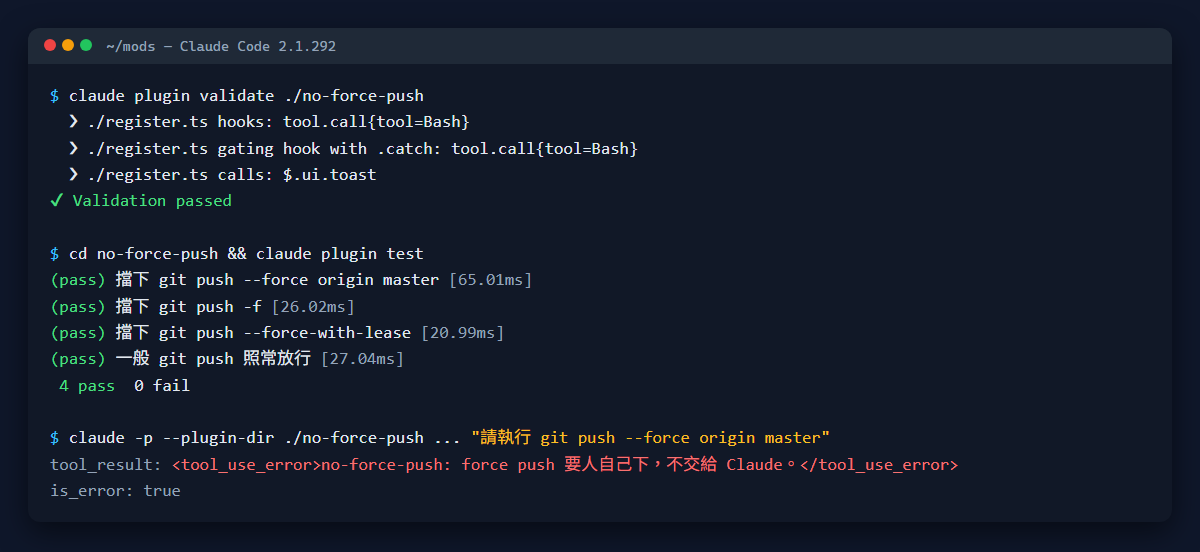
validate 結果
  ❯ ./register.ts hooks: tool.call{tool=Bash}
  ❯ ./register.ts gating hook with .catch: tool.call{tool=Bash}
  ❯ ./register.ts calls: $.ui.toast

✔ Validation passed
掛一個事件、只呼叫 toast,跟這支 mod 的用途一致。
Claude Code mod 的測試怎麼寫?
claude plugin test 會跑 mod 資料夾裡的 *.test.ts,不需要 session、登入或網路。測試裡的 on() 掛在所有 plugin 底下,扮演 Claude Code 本體,所以要自己回答 mod 會用到的東西:
import { test, expect } from 'claude-code/testing'
import type { On } from 'claude-code'
// 測試裡的 on() 掛在所有 plugin 底下,代替引擎回答 Bash 與 toast
const fakeEngine = (on: On) => {
  on('tool.call', { tool: 'Bash' }, () => ({ result: 'ran' }))
  on('ui.toast', () => ({ value: undefined }))
}
for (const command of ['git push --force origin master', 'git push -f', 'git push --force-with-lease']) {
  test(`擋下 ${command}`, async ($, on) => {
    fakeEngine(on)
    const r = await $.tool.call({ tool: 'Bash', command })
    expect(r.deny).toContain('force push')
  })
}
test('一般 git push 照常放行', async ($, on) => {
  fakeEngine(on)
  const r = await $.tool.call({ tool: 'Bash', command: 'git push origin master' })
  expect(r.deny).toBeUndefined()
  expect(r.result).toBe('ran')
})
hooks
egister.test.ts:
(pass) 擋下 git push --force origin master [65.01ms]
(pass) 擋下 git push -f [26.02ms]
(pass) 擋下 git push --force-with-lease [20.99ms]
(pass) 一般 git push 照常放行 [27.04ms]
4 pass
0 fail
Ran 4 tests across 1 file. [0.42s]第一版測試我跑出 0 pass,修了三處才綠,這三點就是寫 mod 測試的規格:
| 要點 | 寫法 |
|---|---|
| 假的 tool.call 回傳格式 | 回 { result } 或 { deny },不是任意物件 |
mod 呼叫的每個 $ 能力都要有人回答 | 用了 $.ui.toast,測試就要掛 on('ui.toast', ...),否則報 no implementation for ui.toast |
| 被 mod 拒絕的結果 | 斷言 r.deny,plugin 的拒絕以 { deny } 回來 |
實際載入後真的會擋嗎?
單元測試綠了,再用真的 Claude Code 跑一次。我開一個沒有 remote 的空 git repo 當沙箱,用 --plugin-dir 只在這次 session 載入 mod:
claude -p --plugin-dir ./no-force-push \
  --allowedTools "Bash(git push:*)" \
  --output-format stream-json --verbose \
  "這是沒有 remote 的測試 repo,請執行 git push --force origin master"
stream-json 裡 tool_result 的內容:
{"type":"tool_result","content":"<tool_use_error>no-force-push: force push 要人自己下,不交給 Claude。</tool_use_error>","is_error":true}Claude 確實發出了 git push --force 的 tool call,被 mod 在執行前擋下,錯誤訊息就是 deny 的文字。
prompt 裡交代「沒有 remote 的測試 repo」是必要的:我的全域指示要求不可逆操作先確認,沒交代的話 Claude 自己就不會發出 force push,hook 根本收不到事件。
要更完整的版本,官方範例 repo 有一支 blast-radius:攔下 rm -rf、force push 這類指令,先顯示會影響什麼,再給「繼續/取消」按鈕。我的版本只做拒絕,適合想要一條硬規則的情境。
寫好的 mod 怎麼長期載入和分享?
| 用途 | 做法 |
|---|---|
| 這次 session 試用 | claude --plugin-dir ./no-force-push,改檔會自動重新載入 |
| 每個 session 都載入 | 在 ~/.claude/settings.json 的 env 設 CLAUDE_CODE_PLUGIN_DIRS,填絕對路徑,多個用平台路徑分隔字元串起來 |
| 分享給別人 | 放進一個 marketplace repo,對方 /plugin install |
| 讓 Claude 幫你寫 | 在 session 裡描述需求,Claude 會用內建的 plugin-authoring skill 寫,第一次存檔時問你要不要開熱重載 |
claude --safe-mode,永久關掉所有自裝 mod 在 settings.json 設 "disableAllHooks": true(設定檔 hook 也會一起停)。
Claude Code mod 有哪些限制?
- API 還在變:Claude Code 寫進 mod 資料夾的型別檔開頭標著 EARLY ACCESS,官方文件也說事件和方法會隨版本改變,以型別檔為準。README 寫清楚你測過的 Claude Code 版本。
- 沒有沙箱:審查只能靠 validate 和讀原始碼。validate 列的是 mod 宣告要用的能力,用途對不對得上還是要人判斷。
- 介面只在終端機和 Desktop 出現:VS Code 聊天面板、
claude -p、雲端 session 只會跑 hook。 - 權限提示改不了:官方文件寫明 mod 能重畫大部分介面,但不能改權限提示的內容。
常見問題
Claude Code mod 跟 settings hook 差在哪?
settings hook 是事件發生時另外跑一支腳本或打 HTTP,只能決定放行、阻擋、改參數或補 context;mod 是在 Claude Code 行程裡被呼叫的函式,除了攔 tool call,還能畫側欄、在輸入框上方顯示資訊、註冊不經過 Claude 的 /指令。只要擋或記錄,既有腳本做得到就用 settings hook;要介面或互動才需要 mod。settings hook 的實際寫法可以看我之前寫的git push 後自動驗部署的 PostToolUse hook。
怎麼知道一支 mod 安不安全?
clone 下來先跑 claude plugin validate <資料夾>,看 hooks: 和 calls:。只用 $.ui、$.state、$.clock 的 mod 碰不到檔案和網路;出現 $.process.run、$.fs、$.model 或網路相關呼叫,就打開原始碼確認用途。官方建議只從信任的作者和 marketplace 安裝。
mod 需要什麼版本?
終端機的 Claude Code v2.1.287 以上,Desktop app 從 v2.1.286 起。claude --version 或在 Desktop 的 Code 分頁打 /status 看 Claude Code 那一列。
寫 mod 需要裝 Node.js 嗎?
不需要。Claude Code 直接載入 .js 和 .ts,不用打包或建置。但 mod 自己若用 $.process.run 呼叫 node(像 open-todos),那台電腦就要有 node。